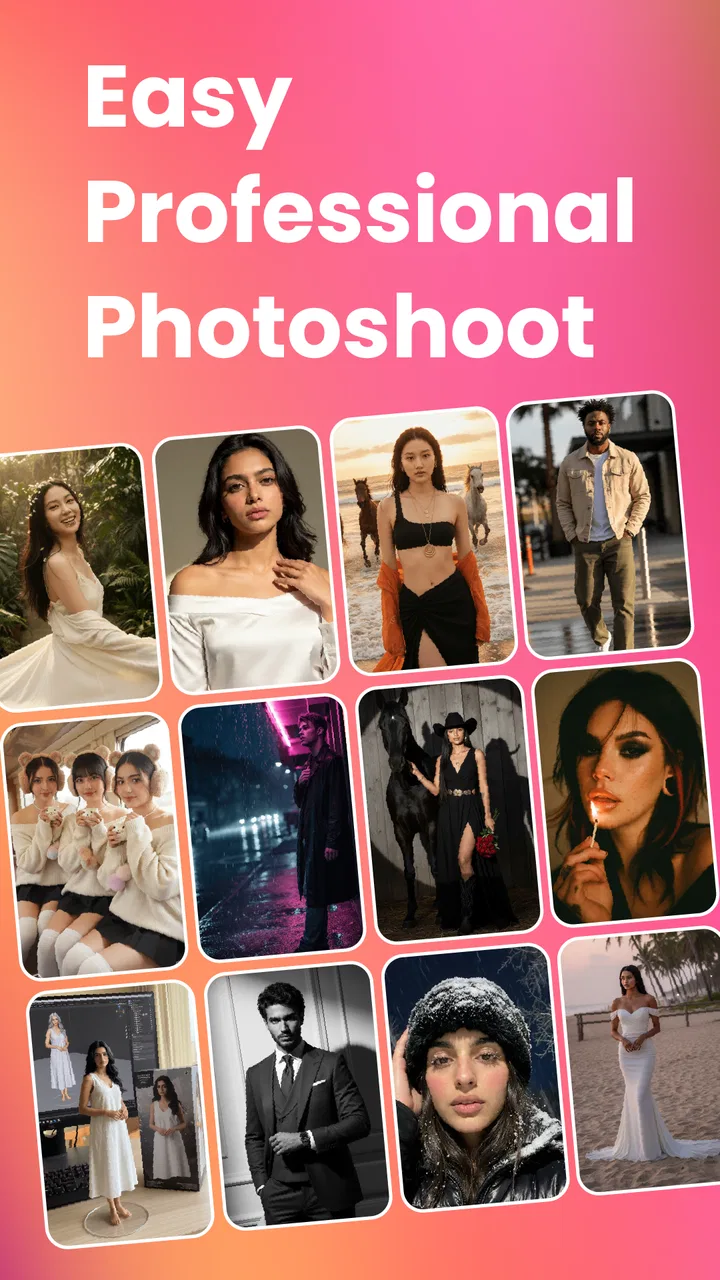
RTST.ai: Video & Photo Editor
- 4.3
- Rating
- 100.00K
- Installs
- Free
- Price

 Analysis by App-foxy
RTST.ai: Video & Photo Editor is the kind of creative app I reach for when I want an eye-catching image or short video without opening a full desktop editor. It sits in the Art & Design category, comes from Dharam AI, and focuses on AI effects, templates, and style-based creation. My first impression is that it is aimed at quick visual experiments rather than careful, layer-by-layer production.
That distinction matters. If you want to turn a photo into something more expressive, test a stylized look, or prepare a social post without spending a long time learning complicated controls, this app makes sense. If your work depends on exact color correction, precise masking, repeatable typography, or detailed timeline editing, I would still choose a conventional photo or video editor.
My overall view is simple: RTST.ai is most useful as a fast idea generator and finishing tool, not as a complete replacement for professional creative software. The free entry point makes it easy to try, while the Teen content rating and optional purchases mean families and regular users should still pay attention to how the app is used.
You May Also Like

 Blood Strike: 2.5 Anniversary
Blood Strike’s Loadouts Turn Every Drop Into a Tactical Gamble
A close look at Blood Strike’s custom loadouts: how fast access to signature weapons reshapes its battle royale rhythm, rewards preparation, and narrows the gap between fights.

 Pandora - Music & Podcasts
Pandora’s Music Is Easy to Start, but Harder to Recover
Pandora’s strength is its low-effort path from a seed to a station. Its weak spot is how much confidence it asks you to place in connection, setup, and quiet recovery.

 8 Ball Pool
 Is Built on Rivalries, Rematches, and Routine
A close look at the rivalries, rematches, shared routines, and unanswered safety questions that turn a quick pool match into a persistent mobile community.

 Samsung Music
’s Quiet Strength Is Playing What You Already Own
Its reach comes less from spectacle than from dependable access to a personal library. That simplicity is both the app’s strongest retention engine and its ceiling.

 AccuWeather: Weather Radar
AccuWeather Review: A Quick, Clear Forecast for Everyday Decisions
For everyday plans, the best forecast is the one you can understand quickly. AccuWeather makes rain timing, radar, and local conditions easy to act on, with a few trade-offs.

 Hill Climb Racing
Why Hill Climb Racing Still Turns Crashes Into One More Run
A tiny car, a bumpy hill and one more upgrade: Hill Climb Racing keeps resurfacing because its simple chaos makes every near-miss feel personal.
More From Our News Desk



How RTST.ai feels when speed matters
The main appeal is the short path from an ordinary image or video to a more dramatic result. Instead of building an effect manually, I can begin with a template or an AI style and judge the visual direction quickly. That makes the app particularly convenient when I have a rough idea but do not yet know which treatment will work.
AI editing is rarely about speed alone. The useful speed comes from reducing decisions: I do not have to search through every adjustment before seeing a possible result. RTST.ai’s combination of effects, templates, and styles appears designed around that kind of browsing. I can compare creative directions first and worry about fine choices later.
There is also a practical advantage for people who are not comfortable with traditional editors. A standard editing app often exposes many sliders and tools immediately, which can make a simple task feel like a project. RTST.ai is better suited to someone who wants a guided starting point. I would recommend it to a student preparing a visual presentation, a casual creator making a post, or anyone who wants to refresh old photos without learning a large interface.
Still, AI generation can make the process feel unpredictable. A result may look impressive at first glance but fail in a small detail, especially around faces, lettering, hands, or busy backgrounds. My advice is to treat the first output as a draft. Save the original, compare several styles, and inspect the image at full size before sharing it.
What makes the workflow useful
One of the less obvious strengths of this type of editor is that it helps with creative selection, not just editing. When I am unsure whether a photo needs a cinematic treatment, a playful effect, or a cleaner presentation, trying several visual directions can reveal what the image is missing. That is more valuable than applying a random filter and stopping there.
I would use the app in three stages. First, choose a clear source image rather than a dark or heavily compressed one. Second, test styles that support the subject instead of hiding it. Third, return to the least exaggerated version and check whether the person, product, or place still feels recognizable. This workflow reduces the common problem of an AI effect becoming the entire message.
Templates can also be useful when the goal is consistency. For example, if I am preparing several images for a small event or a personal project, starting from a related visual treatment can make the set feel connected. The trade-off is that template-driven work may look less distinctive than a design built from scratch, so I would change the source material and avoid relying on the most obvious preset every time.
When heavier use may change the experience
Creating one quick image is a very different task from processing a group of images or experimenting repeatedly with video. AI effects and video work can demand more from a phone than a basic crop or color adjustment. The app’s experience may therefore feel smooth for short sessions but less comfortable during extended creative work, depending on the device and the complexity of the project.
I would be especially careful when working with long clips, high-resolution media, or several variations in one sitting. Before starting, I would close unrelated apps, keep enough free storage available, and avoid beginning a large export when the phone is already warm. These are sensible habits for any mobile editor, but they matter more when the app is generating or transforming content rather than merely trimming it.
Another useful habit is to work in checkpoints. After finding a version I like, I would save or export it before trying a more ambitious effect. That way, a failed experiment does not force me to recreate the earlier result. It also makes comparison easier, because AI-based changes can sometimes move the image in a direction that is visually interesting but unsuitable for the original purpose.
For video, I would plan the creative idea before opening the editor. Decide whether the effect should support the entire clip or only a short section, and keep the source material organized. This reduces unnecessary processing and helps prevent a simple social clip from turning into a long sequence of trial and error.
Stability, recovery, and sensible expectations
My reliability standard for an app like this is not only whether it opens. It should also let me recover from an unwanted result, preserve the source material, and make it clear which version I am currently reviewing. AI editing becomes frustrating when experimentation feels risky, so I would never treat the edited output as the only copy of an important photo or video.
The safest approach is to keep originals in the phone’s normal photo or file storage and use RTST.ai for new versions. For personal snapshots, this may feel unnecessary, but it becomes important for school projects, family recordings, or client-related material. A creative app is much easier to trust when the workflow separates source files from generated results.
I also recommend checking the result before leaving the editing session. Look for changes that are easy to miss in a small preview: distorted edges, altered facial details, unreadable text, or a background that no longer matches the subject. If an effect is attractive but introduces one distracting flaw, a gentler style may be the better choice.
Because the app is free to download, trying it does not require a purchase at the start. However, optional in-app purchases range from $0.99 to $99.99 per item, so I would review any purchase prompt carefully before confirming it. The wide range suggests that casual experimentation and frequent use may lead to very different spending decisions. I would set a personal limit before exploring paid options.
Device limits and who should use it
RTST.ai supports Android devices running version 7.0 or later, which gives it a broad potential audience. That does not mean every compatible phone will deliver the same experience. Older hardware may be comfortable with simple image effects but less suited to repeated video generation or demanding transformations. Screen size, available storage, memory, and battery condition can all affect how enjoyable mobile editing feels.
If your phone is older, I would begin with a single modest image and test the workflow before importing a large collection. Keep the device connected to a stable power source for longer sessions, but avoid covering it while it is working. Heat is not a reason to reject the app, yet it is a sign to pause rather than continue pushing through a heavy task.
People with limited storage should also be selective. AI experiments can create multiple versions, and keeping every variation can quickly make the gallery difficult to manage. I would retain the original, the strongest edited result, and perhaps one alternative. Deleting failed attempts after reviewing them keeps the phone cleaner and makes later searches easier.
The Teen content rating is another point worth considering. I would not hand the app to a younger child without supervision, especially if the device allows purchases. For teenagers and adults, the rating is a reminder to use judgment when transforming personal images or sharing generated media. The creative tools are convenient, but the responsibility for what gets made and published remains with the user.
Where it fits beside ordinary editors
Compared with a traditional photo editor, RTST.ai is more approachable when the desired result is a style rather than a technically exact correction. A conventional editor is usually better for straightening, controlled exposure work, detailed retouching, and precise export decisions. I would use the traditional option when accuracy matters more than surprise.
Compared with a template-only design app, RTST.ai seems more appealing when I want the image itself to change, not just the surrounding layout. A design-focused tool may still win for posters, text-heavy announcements, and brand consistency. RTST.ai is a better companion for the visual treatment underneath those designs.
It also differs from a full video editor. A timeline editor gives me more control over cuts, audio, transitions, and timing. RTST.ai is more attractive when the central task is applying a distinctive visual idea quickly. I would create the effect here, then move to a more detailed editor if the final video needed careful sequencing or precise sound work.
This makes the app easy to place in a broader workflow. I might use it to explore a look, export the strongest version, and finish the project elsewhere. That is not a weakness by itself. In fact, many mobile creators benefit from using a specialized tool for the part it handles best instead of forcing one app to do everything.
Everyday scenarios where it earns a place
Imagine I have taken a group photo at a friend’s birthday and want to share something more memorable than the untouched camera image. I could test a few styles, choose one that keeps the people recognizable, and create a short visual post without spending the evening adjusting individual settings. The important step would be checking faces and background details before publishing.
For a small seller, the app could help turn a plain product image into several attention-grabbing concepts. I would use those versions for brainstorming rather than assume the most dramatic result is the best advertisement. Clear product shape and readable information should come before decoration. If the effect changes the product itself, the image may become attractive but misleading.
A student might use it to create a visual opening for a presentation or a creative assignment. In that case, the app is useful for producing a strong starting image, while a separate presentation tool handles text, structure, and citations. This division keeps the artwork expressive without asking the AI editor to manage information it was not designed to organize.
It can also be a good way to revive a personal archive. I would select a few old photos, test restrained styles, and create a small themed collection. The key trade-off is authenticity: a heavily transformed memory may look polished, but a lighter treatment often preserves more of the original feeling.
Audience, cost, and practical trade-offs
The app has a 4.3 average from around 1.3 thousand ratings, and it has passed the 100 thousand install mark. Those figures suggest that it has found an audience beyond a tiny group of experimenters, although they do not tell me whether every workflow will suit every phone. I see it as a low-risk app to test, provided I approach paid features deliberately.
Its current version is 2.7.3, and the app was released on February 5, 2025. Those details are useful when checking compatibility and deciding whether the app fits a recently updated creative workflow. I would still judge it by the actual tasks I need: one-image experimentation, short video styling, template work, or something more exacting.
I would skip it if I need professional color management, guaranteed repeatability, detailed retouching, or a deep timeline. I would also skip it as my only editor if I regularly produce content where small visual errors could damage trust. In those cases, the usual manual tools offer better control, even if they take longer.
On the other hand, I would recommend giving it a try if the biggest barrier is getting started. The free price makes exploration accessible, and the combination of AI effects and templates can turn a vague idea into something visible quickly. Just remember that “quick” does not always mean “finished.” The final inspection is still my responsibility.
My performance verdict
RTST.ai: Video & Photo Editor works best when I want fast creative direction, not a painstaking production environment. Its strongest quality is the ability to help me move from an ordinary source image toward several possible visual identities. That is valuable for casual creators, social content, personal projects, and early-stage design decisions.
Its limitations are equally clear. AI results need checking, heavier image and video work may be more demanding than simple edits, and paid items require attention because the purchase range is broad. Older or storage-constrained devices deserve a cautious trial rather than an ambitious first session.
After using it as a creative companion, I would keep it alongside a conventional editor rather than replace one completely. I would use RTST.ai to explore effects, build a distinctive starting point, and produce quick variations. I would turn to a more controlled app for exact corrections, complex video assembly, or final professional delivery.
If you want a low-friction way to experiment with AI-driven visual styles, RTST.ai is worth trying; if you need predictable, pixel-level control, choose a traditional editor instead. That balance is what makes the app useful: it does not need to be everything to be a worthwhile part of a mobile creative toolkit.
FAQs for RTST.ai: Video & Photo Editor
01What features does RTST.ai: Video & Photo Editor offer?
RTST.ai provides a comprehensive suite of editing tools for both video and photos. These include AI-driven enhancements, filters, and effects that automatically adjust lighting, color, and sharpness. Users can also access advanced features like background removal, object tracking, and multi-layer editing to create professional-quality content.
02Is RTST.ai user-friendly for beginners?
Yes, RTST.ai is designed with an intuitive interface, making it accessible for beginners. The app offers guided tutorials and tooltips to help users navigate its features. With its AI-powered auto-editing options, even those new to editing can achieve impressive results with minimal effort.
03Does RTST.ai require an internet connection to function?
While many features are available offline, certain AI-driven functionalities and cloud-based resources require an internet connection. For optimal use, especially when accessing the latest filters and effects, a stable internet connection is recommended. However, basic editing can be performed without connectivity.
04Are there any in-app purchases or subscriptions?
RTST.ai offers a free version with essential features, but for access to premium tools and effects, users can opt for a subscription model. This includes options for monthly or annual plans, providing additional filters, advanced AI capabilities, and ad-free usage. Pricing details are available within the app.
05What platforms is RTST.ai available on?
RTST.ai is available for both Android and iOS devices. It supports a wide range of smartphones and tablets, ensuring compatibility with most modern devices. Users can download the app from the Google Play Store or Apple App Store, depending on their device's operating system.
Pros
- User-friendly interface for quick edits.
- Wide range of filters and effects.
- Supports high-resolution exports.
- Real-time editing preview feature.
- Seamless integration with social media.
Cons
- Limited free version features.
- Occasional lag on older devices.
- Subscription model can be pricey.
- No offline editing capability.
- Requires stable internet connection.

RTST.ai: Video & Photo Editor
Gallery